To search
Softonic rating:
Excellent
9/10
License:
Free
Added:
November 30, 2007
Updated:
October 2, 2008
Publisher:
Website
File size:
8.3 MB
Downloads:
19,147
Elena Santos

“Free image editor very similar to Photoshop”

by Elena Santos

When it comes to photo editing, the undisputed king is Photoshop. But if you're looking for a cheaper alternative that can give you the same – or at least similar – functionality then Active Pixels is an excellent choice.

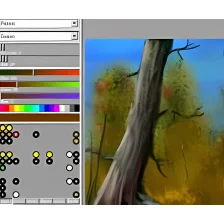
This photo editor resembles Photoshop in many aspects, from the way menus and windows are laid out on its interface to the keyboard shortcuts used for many actions. It also includes similar tools, like the magic wand, the gradient, the polygonal lasso and others. What's more, it supports working with layers. Active Pixels also includes some extra embedded apps, such as a red-eye fixer, a picture browser and a screen capture tool - although it only grabs full-screen images.

That said, bear in mind that this free photo editor is not as powerful as Adobe's big shot. Despite the large number of filters and effects included, some of them lack proper configuration settings. I specially disliked the way sliders are designed: they're very uncomfortable to use.

In any case, Active Pixels is an excellent photo editor that can be very useful for those cases in which you don't have Photoshop at hand or you just prefer to use a lighter app to perform the same tasks.

A great photo editor with which you can edit and optimize images, all for free.
Languages:

English

OS requirements for Active Pixels:

  • OS: Win2000/XP/Vista
Pros
  • Similar to Photoshop
  • Wide variety of special effects
  • Features extra tools
Cons
  • Sliders are uncomfortable to use
  • Some filters are too basic
Did you like this review?
125 of 192 users liked it (65%)

Active Pixels Softonic Rating: 9Featured program

Softonic gives special recognition to software of exceptionally high quality. More information

From the publisher of Active Pixels

Active Pixels could be considered as a free Photoshop clone: a program you can use to edit, retouch and optimize your photos.

Going deeper in the program's features, you'll see Active Pixels includes filters, all kinds of tools, support for layers and an automatic photo optimizer.

One of the most important elements in Active Pixels is filters. It features more than 50 filters conveniently categorized in 9 groups, which you can use to obtain all sorts of effects, from applying a newspaper-like view to your picture to reducing noise or grain.

The program's tools are very similar to those of Photoshop, which makes it easy to manage for all Photoshop users out there. But it also has two important differences when compared to Adobe's big shot: it's free and it's only about 7 MB.

Your opinion is important!
Help other users by being the first to review this program.

Review and rate Active Pixels

  1. Include a good title to improve your review's popularity

  2. What did you think of the program?

    Minimum: 100 characters

Active Pixels options

Active Pixels Options

Reviews for Active Pixels in other languages

Softonic rating:Excellent
9/10

User Rating

8 ratings
Usability
  • Currently 8/10.
Stability
  • Currently 8/10.
Installation
  • Currently 10/10.
Functionality
  • Currently 8/10.
Appearance
  • Currently 10/10.

Download stats